

A WordPress plugin for the staging workflow: clone your live website, rebuild it on the copy – by hand, with Divi, or with an AI agent – and transfer exactly the changes you made back to live. Orders, comments, users and form entries that arrived on live in the meantime stay untouched.
Why we built it
We build most of our client websites with Divi, and we rebuild them on a local copy. More and more of that work is done by AI agents: new pages, restyled layouts, a theme option changed here and there. The copy is the safe place to do it. Getting the result back to the live website was not.
Copying the database back overwrites everything that happened on live since the clone – new orders, new comments, the phone number someone corrected this morning. Rebuilding the changes by hand is slow and easy to get wrong. And the change-tracking tools we tried either recorded too much, damaged Divi layouts on the way, or could not say what would happen before it happened.
So we wrote the tool we wanted: it knows the state of the clone, shows exactly what changed, lets the live website check the package before anything is written, and keeps a way back for every transfer.
Watch the short film above ↑ – the full walkthrough is further down.
Live checks first – and you decide every conflict
When you click Preview, the staging copy builds a package of the selected changes and sends it to the live website. Live applies nothing yet. It checks the package against its own rules – permissions, origin, private storage, Divi version – and answers with a plan: what would be created, updated, moved to the trash, skipped or refused.
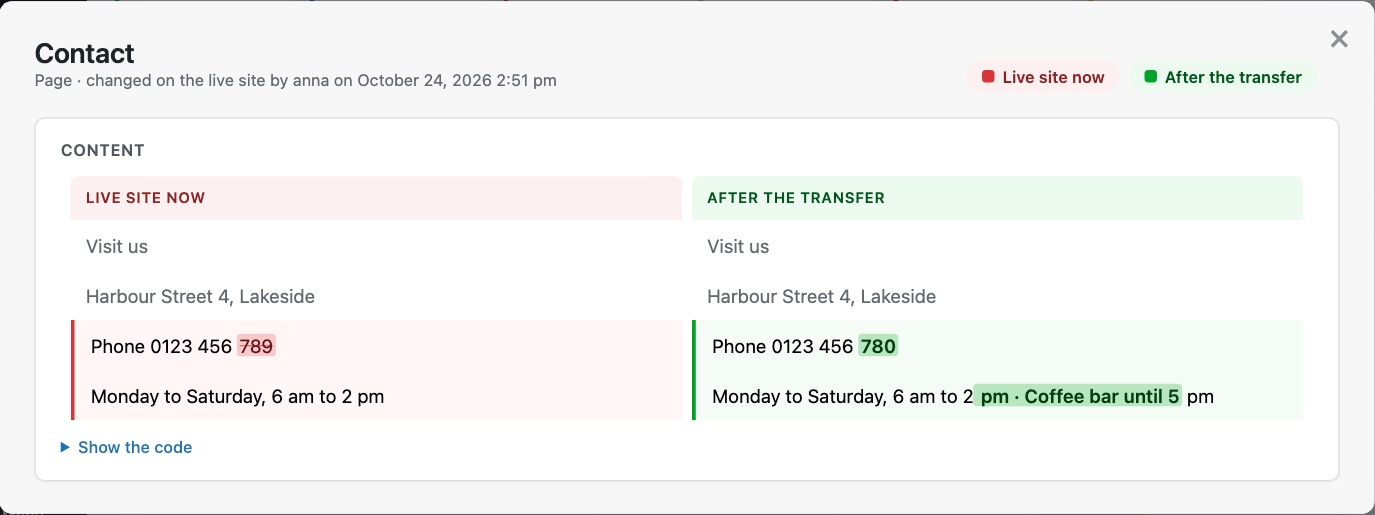
A page that was changed on both sides is never overwritten silently.
You see who changed it on live, and when.
For every conflict you choose: keep the live version, or take the staging version. “Show differences” puts both side by side, field by field. The package you saw in the preview is frozen with a checksum – exactly that one is applied, nothing added later.
Before it writes, the live website protects itself:
- a snapshot of every object it is about to change, and a journal of every step
- every object in its own database transaction – all of it or nothing
- a lock, so two transfers never run at the same time
- no mail while it writes – publishing a page does not send notifications
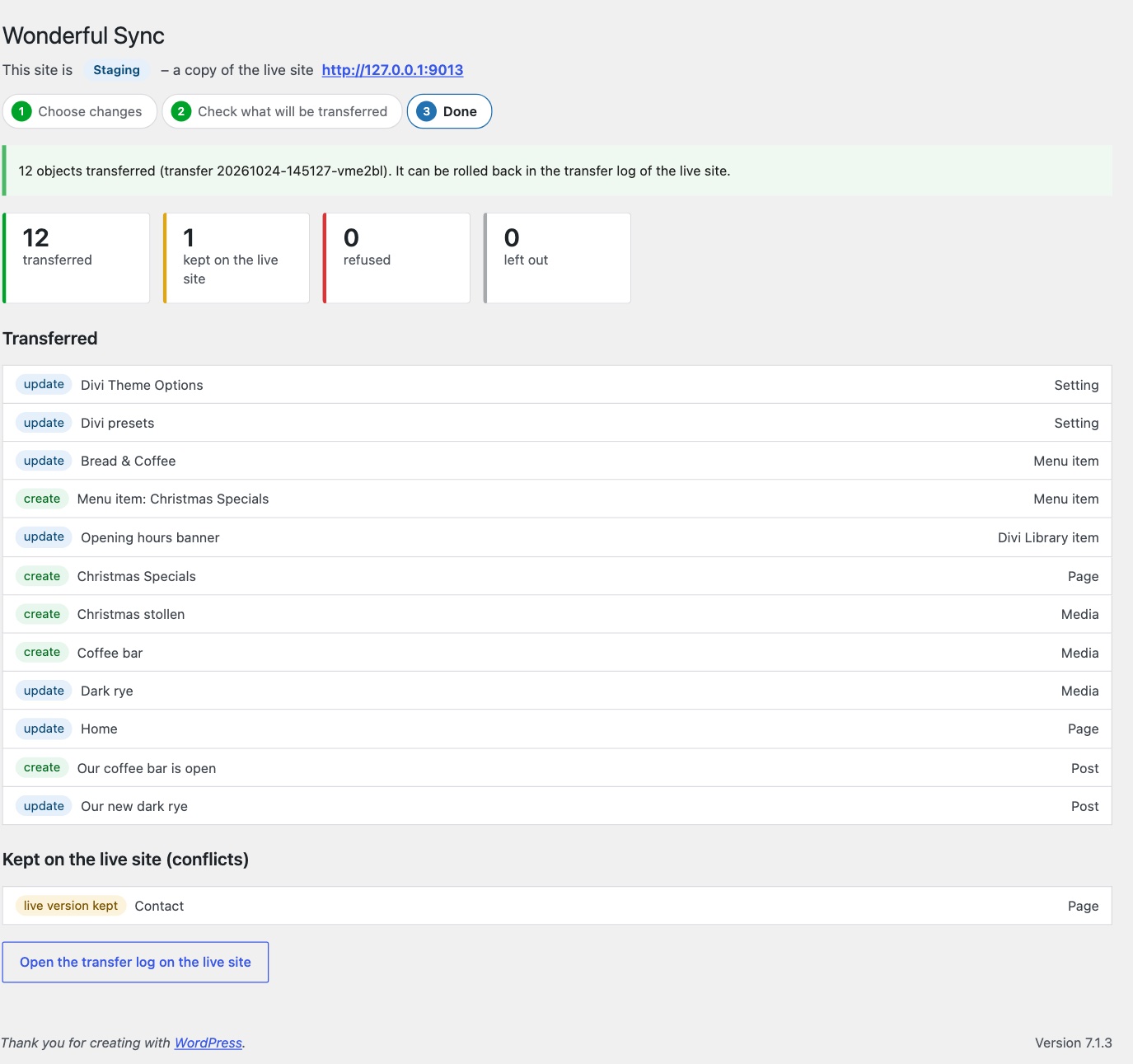
If the connection drops halfway, live keeps going and the staging copy asks for the result. If the server stops halfway, the journal knows every step, and the transfer can be rolled back.
What else it does
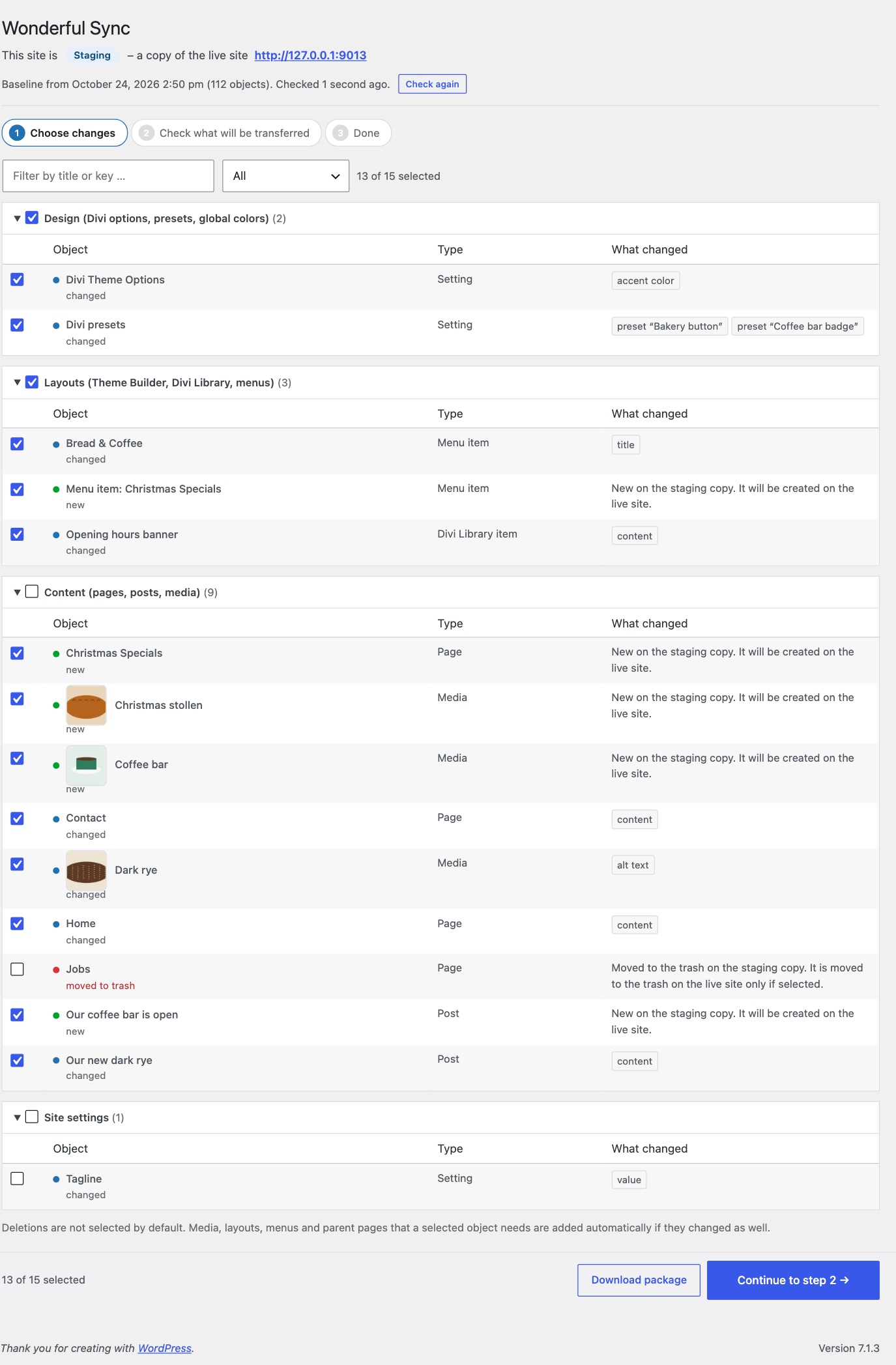
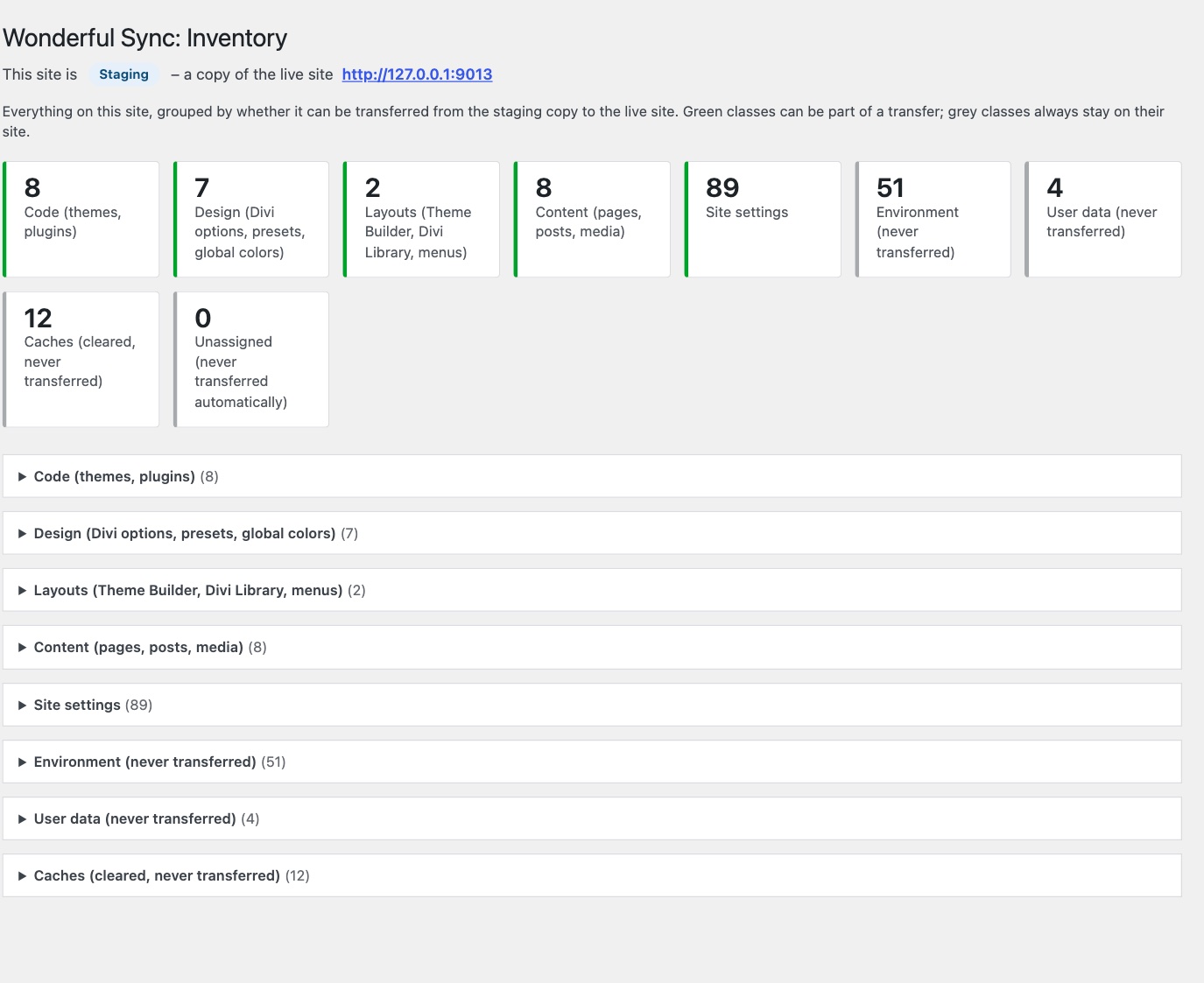
- Lists the changes since the clone, grouped into design, layouts, content and site settings, with the fields that changed – title, content, accent color.
- Divi 4 and Divi 5: pages, Theme Builder templates, header, body and footer layouts, library items, theme options, presets, global colors, Customizer, menus. Gutenberg pages work the same way.
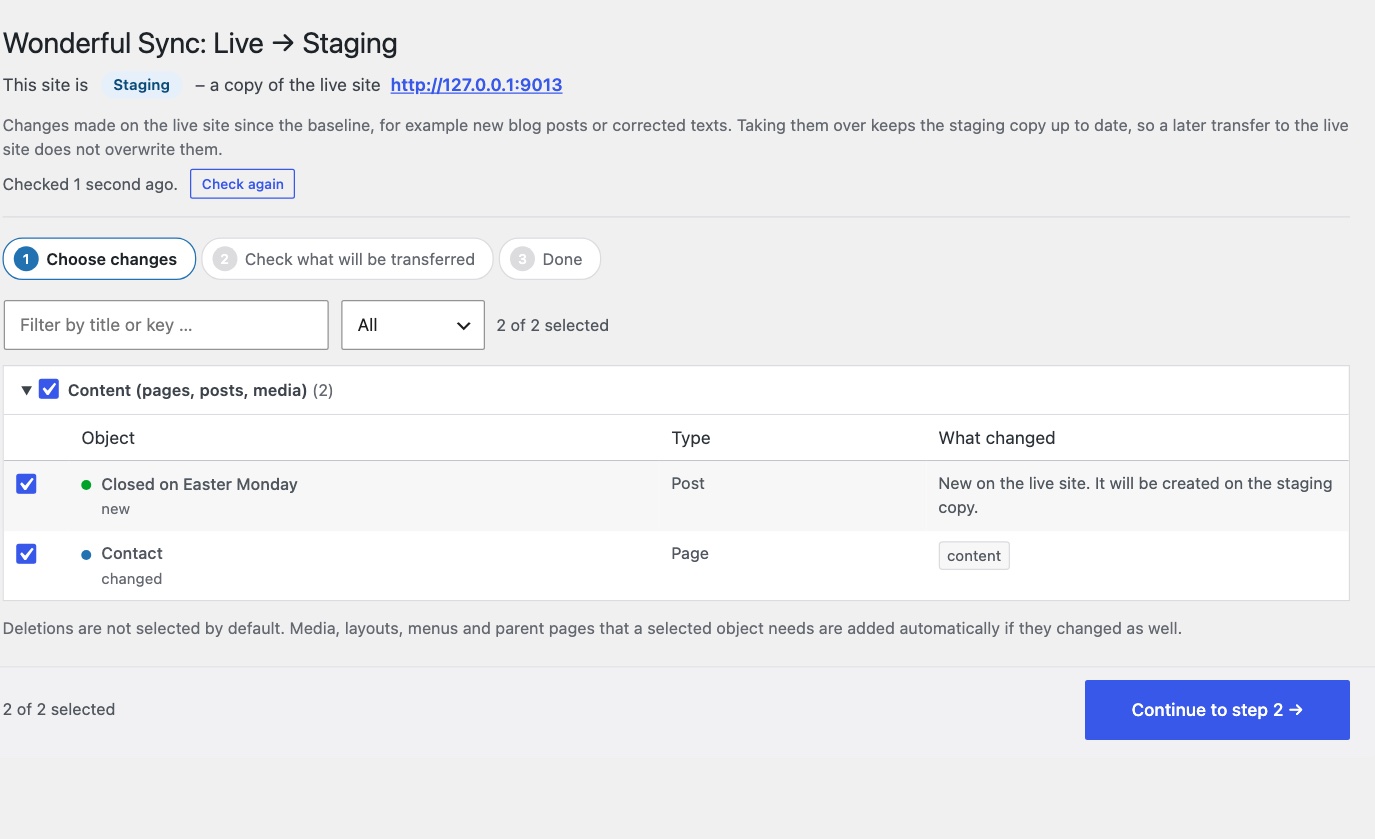
- Live to staging: changes made on live since the clone – a new blog post, a corrected text – are listed on the staging copy and taken over with the same check, conflicts and rollback, so a later transfer does not overwrite them.
- Divi in detail: uploaded fonts with their files, Theme Builder conditions such as “only on page X”, menus and categories in modules, dynamic content and references inside presets point to the right objects on live.
- Pods: relationship and file fields travel with their posts, IDs included; pods, field groups and fields too, if you want. Flatsome: image IDs in UX Builder shortcodes.
- Media with the original file and all image sizes.
- Rewrites IDs and URLs on the way: a new image gets a new ID on live, and every Divi module, block, menu item and Theme Builder assignment that points to it follows. Staging addresses are replaced, also inside JSON and serialized data.
- Brings along what a selected object needs – an image, a layout, a parent page – if it changed too.
- Never preselects deletions; deleted pages go to the trash on live.
- Works without a direct connection: download the package on staging, upload it on live.
- Command line for scripts and AI agents:
wp wsync status,push --dry-run,push --preview=<id>,rollback,pull– with JSON output and exit codes. - Keeps a log of edits on every site, so a conflict can say who changed what.
What it deliberately does not do
It does not copy themes or plugins – it shows which ones are missing, inactive or older on live, and holds back Divi data when live runs an older Divi. It never transfers users, comments, orders, subscriptions, stock, form entries, licence keys, API keys or payment settings. It is not a continuous two-way sync and not a backup plugin: make a backup before the first transfer, as with every deployment. Multisite networks are not supported.
What travels, what never does
Everything on a site is sorted into classes. Only design, layouts and content – and site settings, if you select them – can be part of a transfer.
- Can travel: pages, posts and custom post types, media, Divi Theme Builder and library, theme options, presets, global colors, Customizer, Additional CSS, menus, categories and tags, front page and reading settings, widgets, settings of well-known plugins such as Yoast or Rank Math.
- Never travels: users and roles, comments, orders and customers, stock and sales figures, form entries, site address and admin e-mail, search engine visibility, active plugins and theme, keys and passwords, caches and revisions.
Settings of plugins we do not know are marked “unassigned” and never move automatically – the inventory shows them, and a filter can classify them. Values that look like keys or passwords keep the live value, even inside a Divi option.
A way back for every transfer
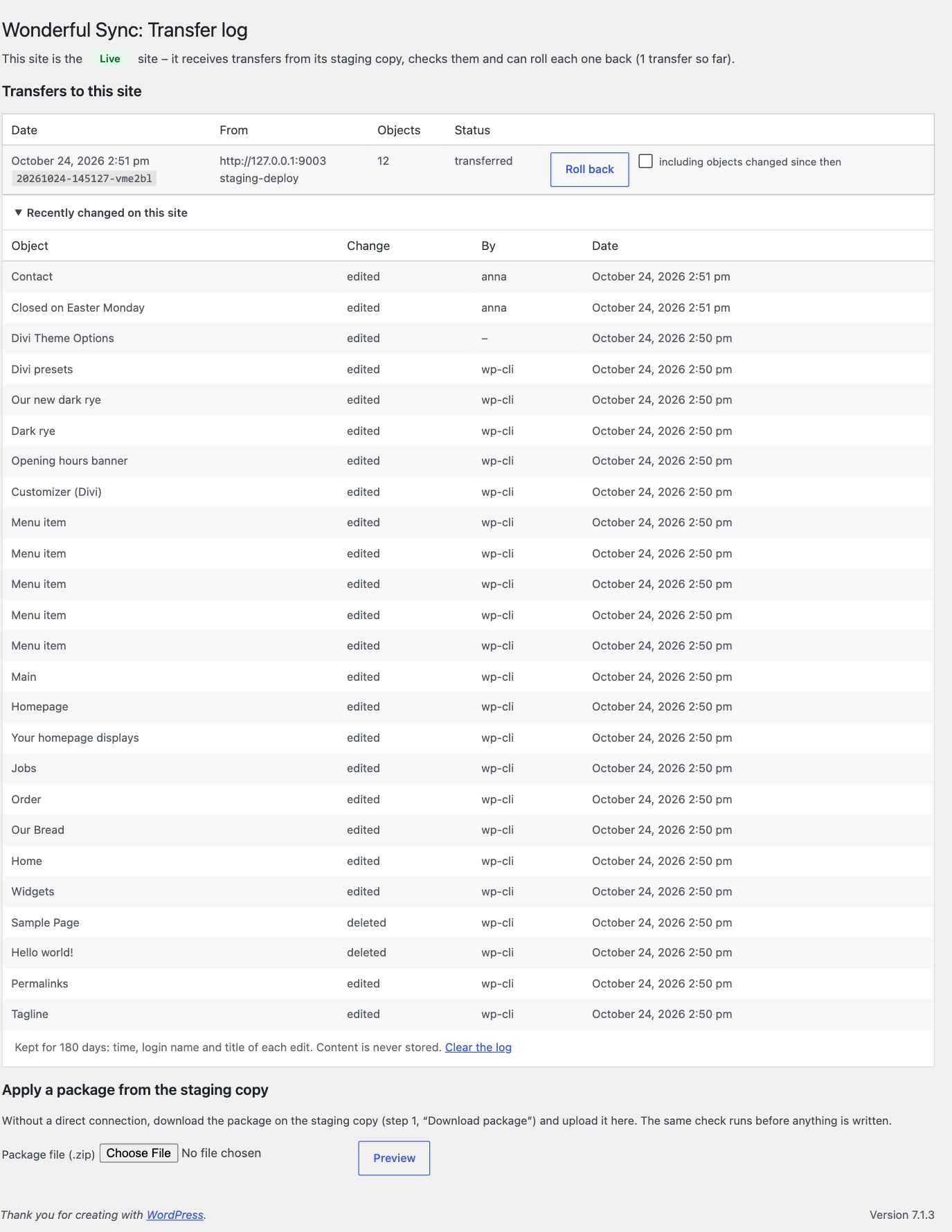
The live website lists every release with date, origin, user and number of objects, and a Roll back button. Objects that were edited again on live after the transfer are only restored when you ask for it. New pages that already have comments are set to draft instead of being deleted. The same works from the command line with wp wsync rollback <id>.
How it is built
Development is test driven: about 150 unit tests cover the cases that decide whether a transfer is safe – secrets in nested values, meta keys the database treats as equal, a package altered after the preview, a rollback after a crash.
Every change also runs end to end on copies of real Divi websites: two clones of the same backup, one rebuilt as staging, one acting as live with comments and edits of its own. A robustness test stops a transfer halfway with kill -9 and checks that the rollback restores the exact previous state, applies the same package twice (the second time nothing happens), and runs with a 256 MB memory limit and behind a proxy that gives up after three seconds.
On a large Divi website with 290 changed pages and layouts, a transfer takes about seven seconds and its rollback about five.
Safety rails
- The live website accepts transfers only from a dedicated deploy user with an application password; that user can do nothing else through the REST API.
- Live refuses transfers while its storage could be reached from the web; snapshots are kept outside the web root or in a protected folder.
- Only the staging copy of this live website may send: the address recorded at clone time has to match.
- Unknown fields, oversized values, unsafe file names and stored PHP objects are refused before anything is written.
- No mail is sent while a transfer or a rollback writes.
Privacy
No vendor backend, no telemetry. The staging copy talks only to the live website you configure. The log of edits stores the login name and the time of an edit, never content; the last 2000 objects are kept, and the log is removed together with the plugin.
Full walkthrough
Four minutes, one site from start to finish: Divi presets and theme options, photos and their alt texts, a renamed menu entry, Divi and block editor content side by side, a conflict with the live site, the transfer and its rollback – and the way back from live to staging.
Requirements
- WordPress 6.2 or newer
- PHP 7.4 or newer
- Installed on the staging copy and on the live website
- HTTPS on the live website (application passwords)
- No multisite
Available in English and German (de_DE, de_AT, de_CH). Released under the GPLv3.
Questions, bug reports, feature requests, or feedback? Get in touch!