

A small WordPress SMTP plugin that does three things and nothing else: it sends your mail over SMTP, it writes down what happened, and it tells a webhook when a message fails.
Why we built it
We wrote this because the plugin we had used for years broke live sites. Not in exotic ways either: a version lands overnight, quietly migrates its own settings, and by morning the shop has stopped confirming orders — on every site it was installed on, at the same time. A release that does that has not been tested against an existing installation, and an existing installation is the only state that matters once a plugin is in production. That is not bad luck. That is poor software quality.
Many alternatives had gone the other way. One vendor moved the email log behind a paid tier. Others grew into suites — API providers, OAuth flows, deliverability dashboards, upgrade banners in the admin — until a plugin whose only job is “connect to a mail server” became one more thing you have to watch. The engineering effort went into the upgrade path, not into the part that has to keep working. Every feature you did not ask for is a surface that can break, and this thing sits in the path of every email your site sends. Mail is also the part your customers notice first: an order confirmation that never arrives is a support ticket, a password reset that never arrives is a locked-out client.
So we built the slim alternative and we run it in our own production environment, on our own client sites. It is the same code you are installing — there is no internal version with the sharp edges filed off.
Attachments that survive, so a resend actually resends
This is the part most email logs leave out, and it is the one that decides whether the log is any use. A log records the path an attachment had when the message went out — not the file. Some plugins keep what they send; plenty of others do not. Form uploads written to a temporary directory, one-off exports, reports generated for a single send: those are gone within the hour.
And a log that cannot resend the file is not much of a log. What is the point of resending an invoice email without the invoice?
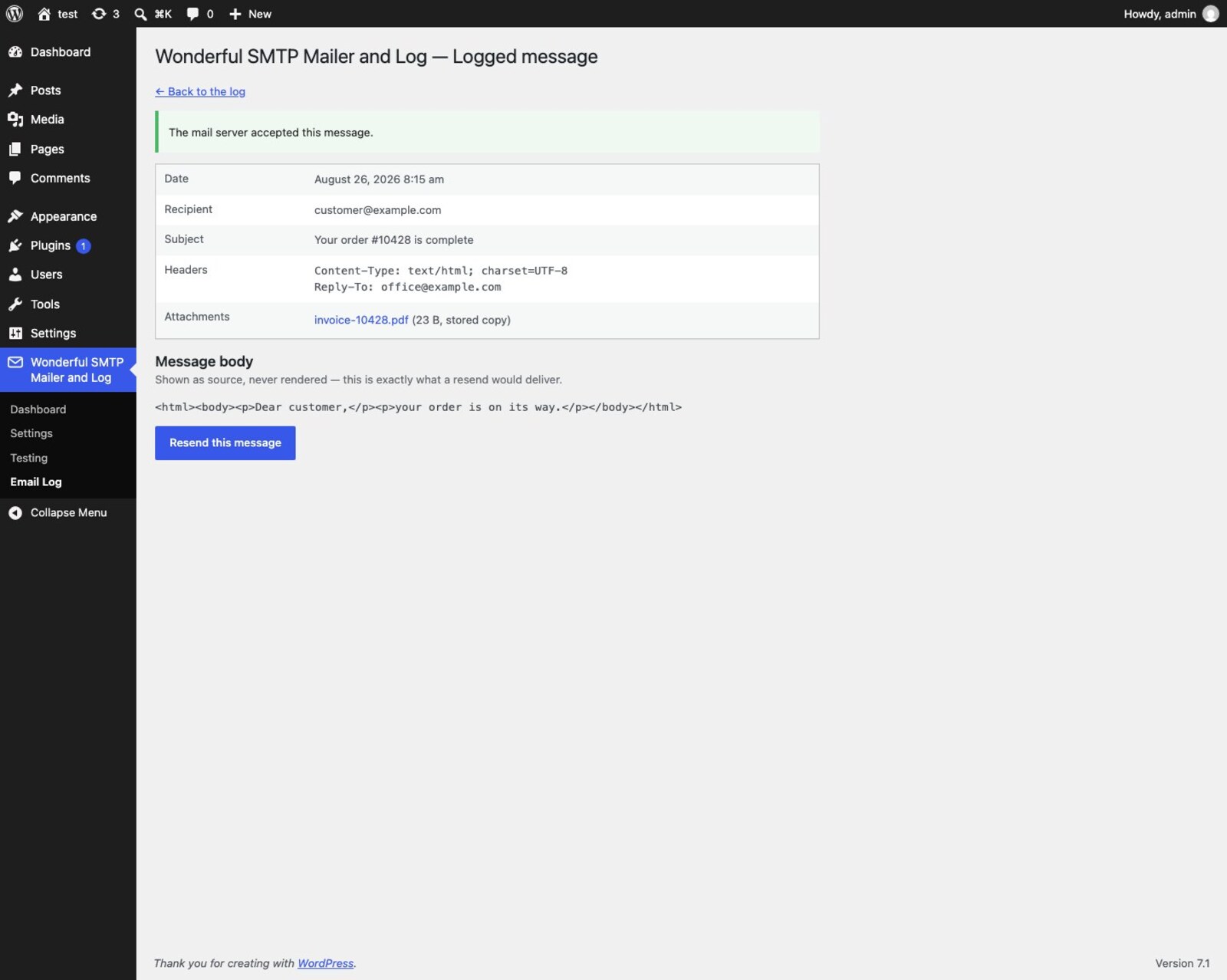
So switch attachment storage on, and a copy is kept regardless of what the sending plugin does, for as many days as you choose. A message resent three weeks later still carries exactly what it was sent with, under its original filename.
Because those copies are customer documents sitting on disk, they are contained rather than trusted:
- a directory that denies web access and carries its own
index.php - each file stored under a random 32-character name with a neutral
.binextension — nothing there is guessable, and nothing there is something a web server would execute even if the directory protection were bypassed - the original filename kept in the database and restored on download and on resend
- a 10 MB cap per file
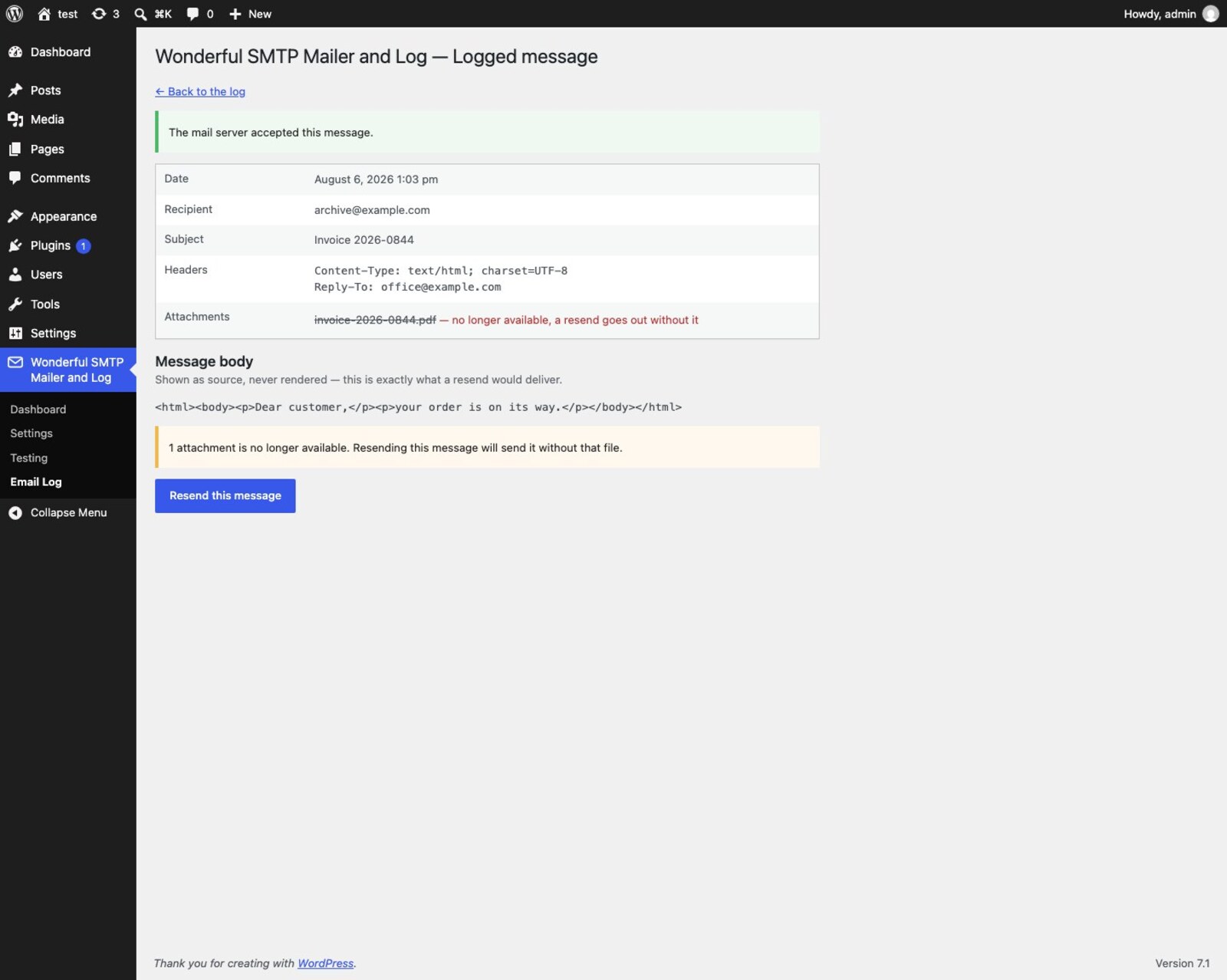
- a daily job that deletes copies past their period; deleting a log entry always takes its copies with it, and deactivating the plugin removes all of them
Once a copy is gone the message says so — the attachment is struck through as no longer available, and you are warned before resending rather than quietly sending it short.
What else it does
- Routes every
wp_mail()call over your SMTP server — WooCommerce, contact forms, core password resets, all of it, without touching their code. - Host, port, encryption (STARTTLS, SSL/TLS or none), optional authentication.
- Sender address and name, with an explicit switch for whether they override a sender another plugin already set.
- A connection check that logs in to your mail server and hangs up without sending anything.
- A test message that shows you the actual SMTP conversation — when a server answers “535 5.7.139 Authentication unsuccessful”, you read that line instead of guessing.
- A failure simulation and a webhook test, so you can prove the alerting works before you need it.
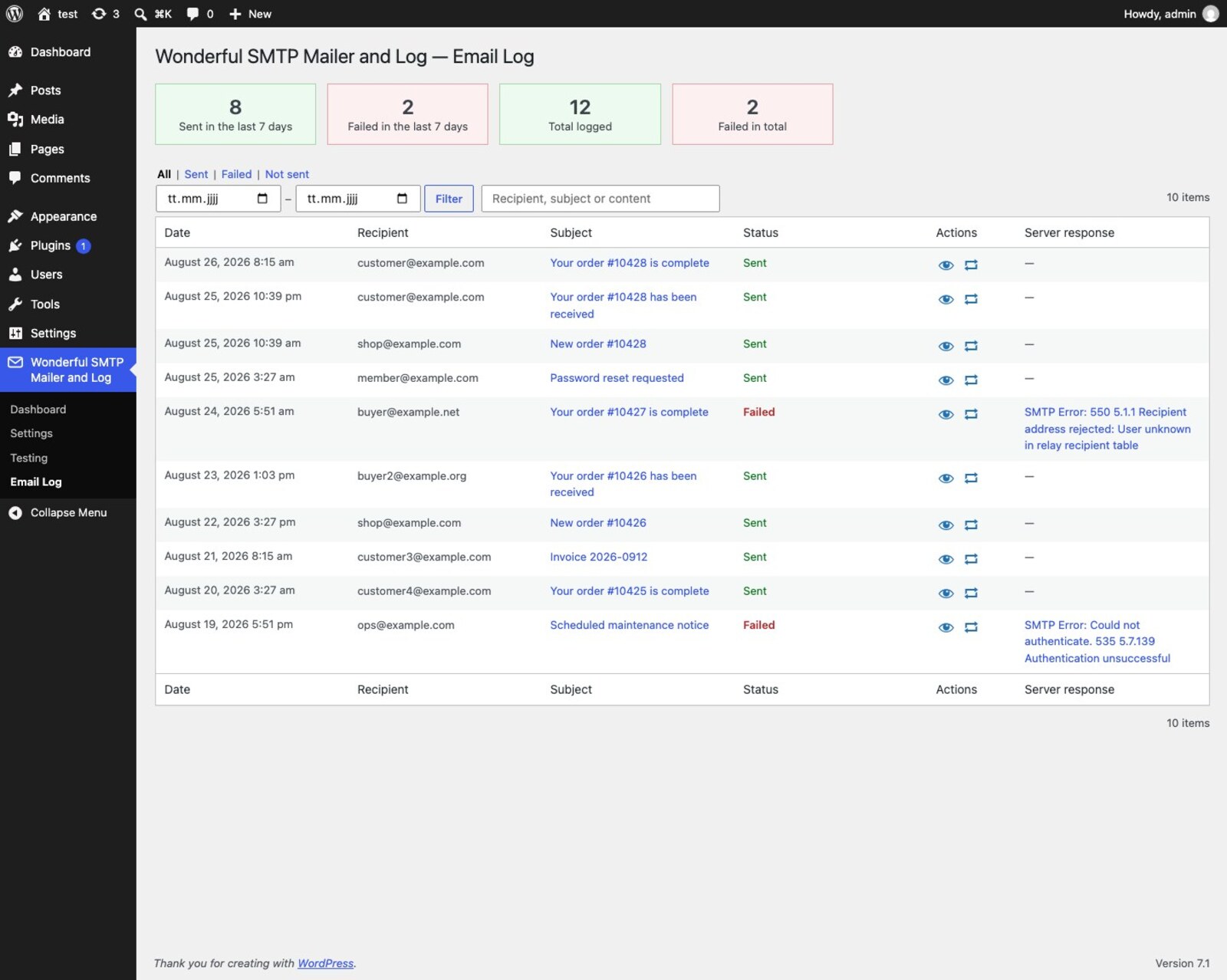
- An email log with delivery counts, a date range filter, and full-text search across recipient, subject and message body.
- A resend that asks first and lets you correct the address — the usual reason to resend is that the original one was mistyped.
- A log-only mode that records every message and hands none of them to the mail server — the setting a staging site needs. It is announced on every admin screen, because a site that has silently stopped sending is exactly the thing nobody notices.
- An optional webhook that fires on failure, so Zapier, n8n, Make or your own endpoint can raise an alert.
What it deliberately does not do
No API providers, no OAuth, no fallback connections, no deliverability score, no dashboard widget, no newsletter integration, no pro tier, no advertising for one, and no upsell notices. If you need those, one of the big plugins will serve you better, and that is a fine outcome.
Configuration from wp-config.php
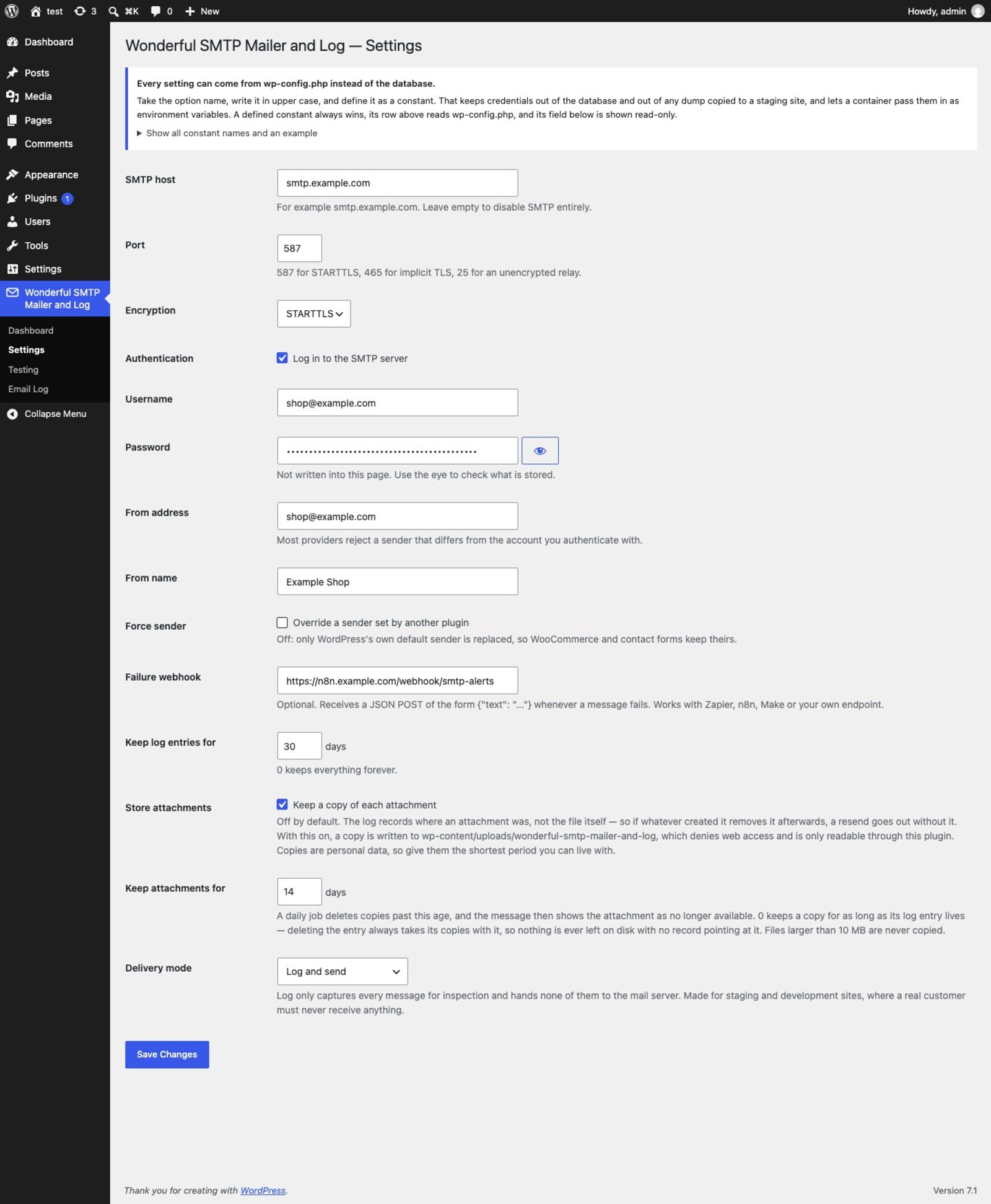
Every setting can come from a constant instead of the database, following one mechanical rule: the option name in upper case. That keeps credentials out of the database and out of any dump copied to a staging site, and lets a Docker container pass them in as environment variables.
define( 'WONDERFUL_SMTP_MAILER_AND_LOG_HOST', getenv( 'SMTP_HOST' ) );
define( 'WONDERFUL_SMTP_MAILER_AND_LOG_PORT', (int) getenv( 'SMTP_PORT' ) );
define( 'WONDERFUL_SMTP_MAILER_AND_LOG_USERNAME', getenv( 'SMTP_USERNAME' ) );
define( 'WONDERFUL_SMTP_MAILER_AND_LOG_PASSWORD', getenv( 'SMTP_PASSWORD' ) );
A defined constant always wins, the dashboard shows which values arrived that way, and the matching field is displayed read-only so the two cannot silently disagree.
Testing without sending
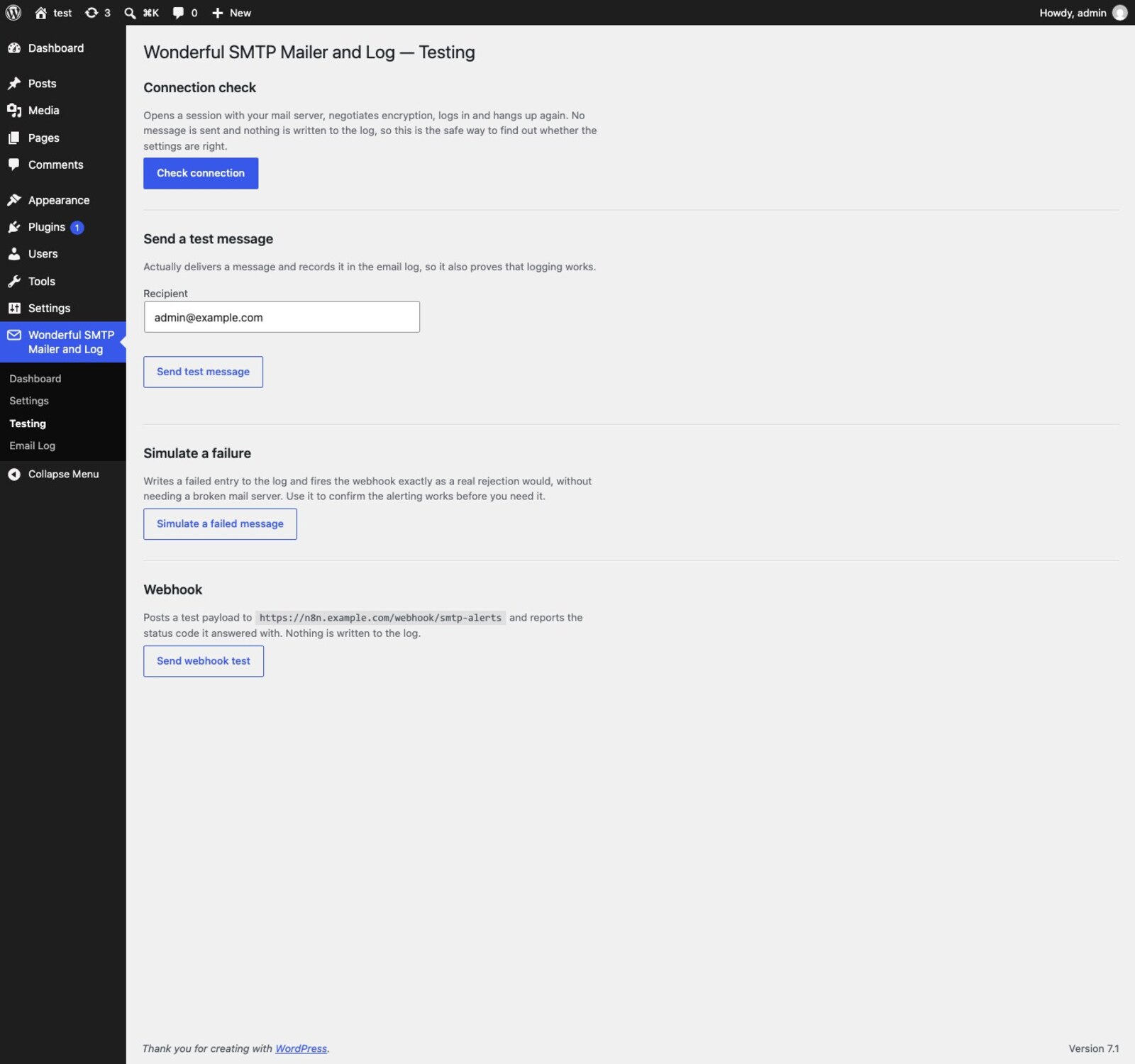
The testing screen answers “are the host, port, encryption and credentials right?” without putting a message into anyone’s inbox — and if something is wrong, it shows you the server’s own words rather than a generic error. Two more buttons prove the other half: one writes a failed entry and fires the webhook exactly as a real rejection would, the other posts a test payload and reports the status code it came back with.
How it is built
Development is test driven, and the suite covers the behaviour that decides whether your mail actually leaves the building: that an unconfigured plugin keeps its hands off PHPMailer entirely, that “none” really disables TLS instead of quietly upgrading, that a sender another plugin set on purpose survives, that a corrupt delivery-mode value falls back to sending rather than silently swallowing your mail, that log-only mode never once reaches the mailer, that headers and attachments survive into a resend intact, and that the retention purge deletes what is past the cutoff and nothing else.
Those tests run together with the WordPress coding standards, a PHP 7.4 compatibility lint and WordPress.org’s own Plugin Check every single time, before a release is built at all. An error in any of them stops the release — the pipeline refuses, it is not a checklist someone waves through.
That discipline is also why the feature list is short. Every feature is a promise that has to keep working.
Safety rails
- With no SMTP host configured the plugin stays out of the way entirely and WordPress keeps using PHP
mail()— installing it cannot take your email down. - The stored password is never written into the HTML of the settings form, and a password defined in
wp-config.phpis never handed back at all. - “Force sender” is off by default, so plugins that set their own sender on purpose keep it.
- Nothing retries by itself, so a failing server can never turn into a mail loop.
- PHPMailer’s 300-second default timeout is cut to 30, so a mail server that has stopped answering cannot hold a checkout open.
- No runtime dependencies. The plugin uses the PHPMailer that ships with WordPress itself — there is no vendor directory and nothing to keep patched.
Privacy
The plugin has no vendor backend, sends no telemetry and phones home nowhere. It contacts exactly two endpoints, both of which you configure yourself: your SMTP server, and — only if you fill in the field — your own failure webhook. The webhook payload carries the site URL, the recipient, the subject and the error the mail server returned; no message body and no credentials. Message contents, log entries and any stored attachments stay in your own installation.
Requirements
- WordPress 6.2 or newer
- PHP 7.4 or newer
Available in English and German (de_DE, de_AT, de_CH). Released under the GPLv3.
Questions about this tool? Get in touch.