
Wordfence records every request its firewall classifies as an attack. One attack rarely justifies a block — but the same address showing up again and again within a few minutes almost always does. Wonderful Repeated Hit Blocker for Wordfence watches that attack log and blocks the repeat offenders for you, automatically.
You set the rules. Decide how many logged attacks within how many minutes are enough, and how long the resulting block lasts. The defaults block an address for 30 days after 5 logged attacks within 10 minutes. Scanning runs on WP-Cron every 5 minutes, configurable between 1 and 60.
Blocks are created by Wordfence, not behind its back. Every block goes through Wordfence’s own public blocking API (wfBlock::createIP()) instead of raw writes into its database tables. That means the Wordfence allowlist is always honoured, the block appears in the normal Wordfence Blocking screen and can be removed there, the firewall is synchronised exactly as it is for a manual block, Wordfence’s own counters stay correct — and schema changes in future Wordfence releases cannot corrupt your block table.
Safety rails so you cannot lock yourself out. Only requests Wordfence flagged as attacks are counted — ordinary visitors, crawlers and your own browsing are never part of the calculation. Your IP address is added to the plugin’s allowlist on activation, and the settings screen tells you if it is not covered. Addresses that already carry an active Wordfence block are skipped, so blocks are never silently extended and alerts are never repeated. Without Wordfence the plugin does nothing at all and says so with an admin notice.
Optional alerts. Enter a webhook URL (Slack, Discord, Mattermost or your own endpoint) and you get a message for every new block. Leave the field empty and the plugin makes no outbound connections whatsoever — it never contacts us either.
Screenshot
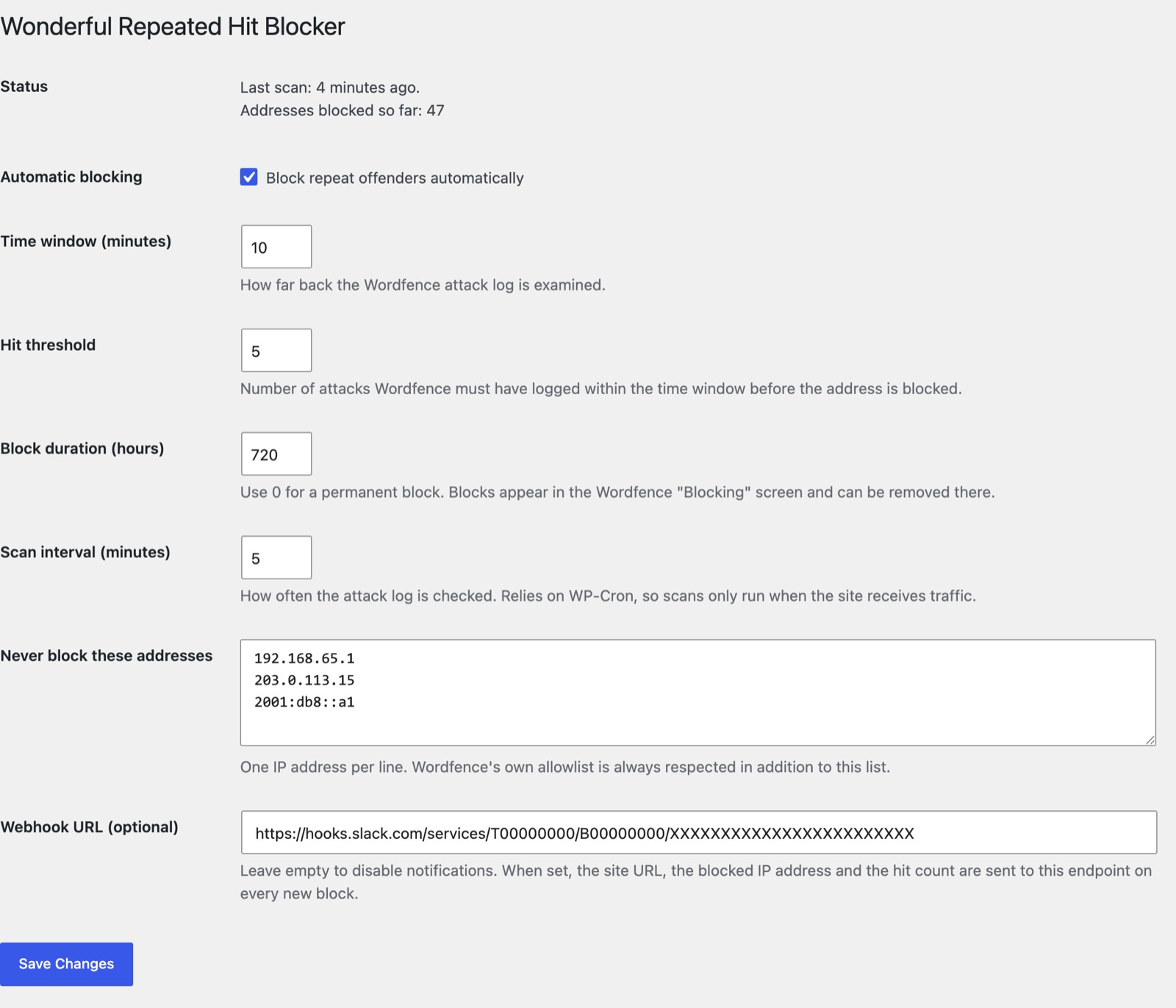
Settings → Repeated Hit Blocker: time window, hit threshold, block duration and the allowlist that keeps your own address safe.
Coming soon to WordPress.org.