
Wonderful ID Photo
Make your passport photo yourself. An ordinary photo in front of a light wall becomes a passport photo to the official sizes – and 4 or 8 of them fit on one ordinary photo print. 100 % offline, no subscription.
Version 1.0 · Mac (macOS 14+, Apple silicon), iPhone and iPad (iOS 17+) · 8 languages (in German: Wonderful Passfoto)
Available on the App Store for Mac, iPhone and iPad. One-time purchase, no subscription.
Why does a passport photo cost more than an ordinary photo? It is just a photo – cropped to the right size, on a plain background.
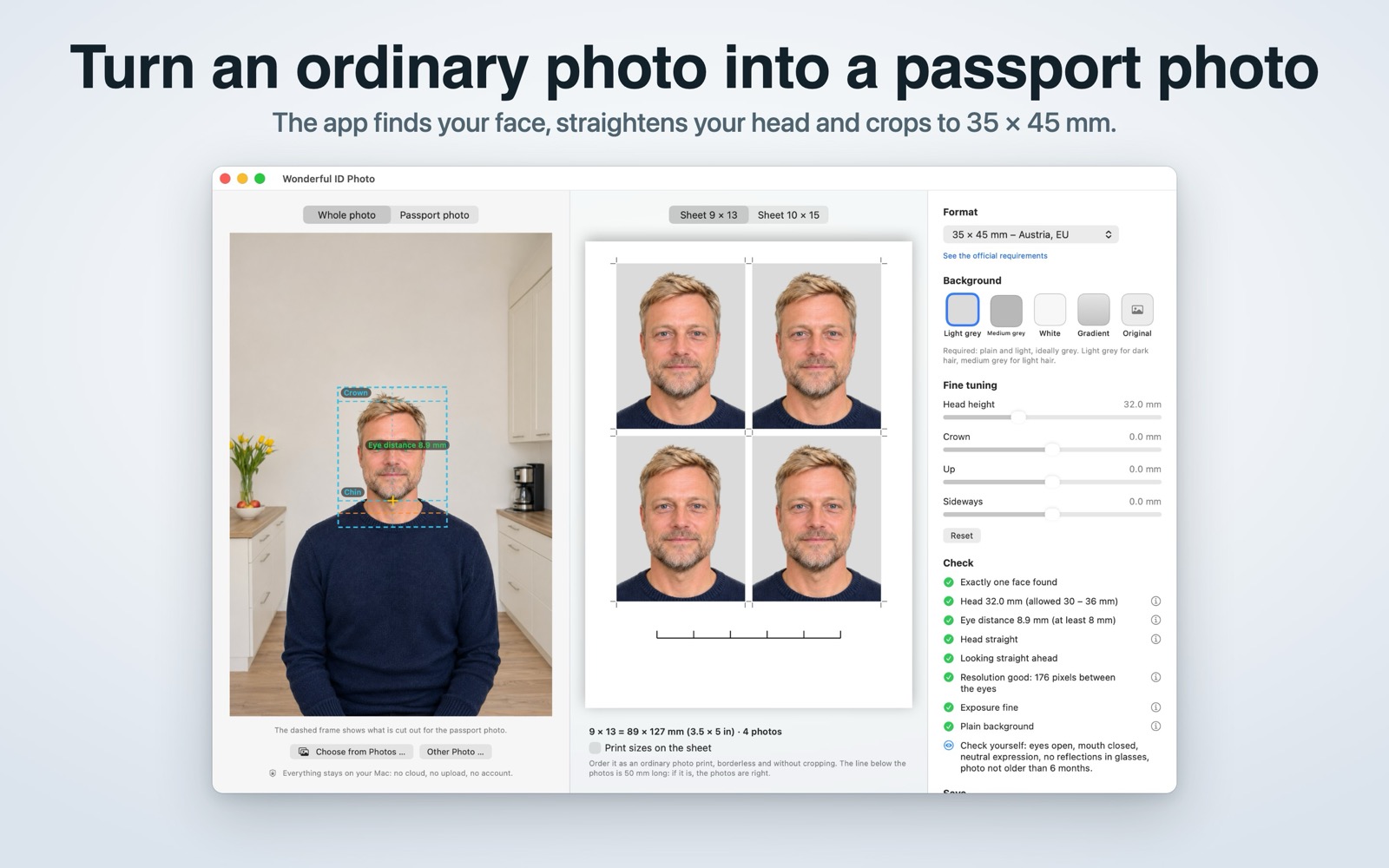
Wonderful ID Photo finds the eyes, chin and crown, straightens the head, makes the background plain and crops to the official size without distorting anything. Then it lays the photos out on an ordinary photo print, which you print for a few cents – instantly at a photo kiosk or ordered online.
Get it
Wonderful ID Photo is available on the App Store for Mac, iPhone and iPad. One-time purchase – no subscription, no in-app purchases, no account.
Why we built it
Passport photos are expensive, and most apps for them want a subscription or upload your face to a server. Making one yourself only needs a decent photo and the right measurements – and a print sheet in exactly the shape of the photo paper, so nothing gets cropped.
How it works
1. Photo in: drop a photo, pick it from the Photos app or paste it. Best taken from the front, in front of a light wall, in even daylight.
2. Checked automatically: head height from chin to crown, eye distance, head straight and centred – shown with guides and dimension lines. A checklist says what fits and explains every point. Sliders for head height, crown and position if you want to help.
3. Plain background: light grey, medium grey or white.
4. Save: one photo for online applications (35 × 45 mm, 827 × 1063 pixels), or a print sheet.
Print sheets and formats
9 × 13 (89 × 127 mm, 3.5 × 5 in) with 4 passport photos, 10 × 15 (102 × 152 mm, 4 × 6 in) with 8. The file has exactly the proportions of the paper, cut marks show where to cut, and an optional 50 mm reference line tells you after printing whether the size is right.
Formats: 35 × 45 mm for Austria and most of Europe, 35 × 45 mm for the United Kingdom, 2 × 2 in for the USA, 50 × 70 mm for Canada – each with a link to the official requirements. Whether a photo is accepted is up to the authority; please check its current requirements.
Privacy and permissions
100 % offline: no upload, no account, no server, no tracking, no network access at all. The app is sandboxed and only reads the photo you drop, paste or pick – from the Photos app it receives just that one photo, not your library. Face detection and background removal run on your Mac; nobody is identified and nothing is stored.
What it deliberately does not do
It does not beautify, slim or retouch faces – passport photos must not be altered. It does not upload anything and has no account, no subscription, no analytics and no network code of any kind.
Requirements
macOS 14 (Sonoma) or newer on Apple silicon. English and German, following the system language.
Questions, bug reports, feature requests, or feedback? Get in touch!