

A notification card in the corner of the screen is one of the few ways to say something on a website without interrupting anyone. Wonderful Notification Popups lets you write those messages yourself — a running promotion, a short customer quote, opening hours, a delivery note — and decide exactly when and how often they appear.
Everything stays on your own server. The plugin contacts no external service, loads no remote fonts or scripts and sends nothing anywhere. The messages come from your own database, and each popup is assembled in the visitor’s browser from data that was already part of the page.
Start with the sample set. One click on the settings page creates eight ready-made notifications covering the usual cases — a recent order, free shipping, a sale, a customer quote, a stock notice, a newsletter hint, a trust note, a thank-you. They arrive as drafts, so nothing shows up on your site until you publish what you actually want. Removing them again is one click, and it only ever touches the samples.
Three ways to give a notification an icon. Nineteen built-in line icons drawn inline in the accent colour of the notification — no icon font, no extra request. An emoji, if that says it faster. Or an image from your own media library, for a logo or a photo.
You decide what starts them. Right after the page loads, once the visitor has scrolled far enough, once a chosen element becomes visible, or when the visitor is about to leave. Then set the rhythm: delay before the first popup, pause between two, how long each stays, and a maximum per page view. Returning visitors can be left in peace for a number of hours, and popups pause while the tab is in the background so nobody comes back to a queue of messages.
And what they look like. Any of the four corners, with adjustable distance from the edges and an adjustable stacking order — so a sticky header, a cookie banner or a chat button cannot bury them. Light or dark scheme, an accent colour for the whole site and a per-notification style, an optional close button, and an option to hide popups on small screens.
Multilingual sites are handled properly. Each notification can be assigned a language, and visitors only see the ones matching the language the page is rendered in, plus everything marked “All languages”. Regional variants match each other, so a German notification also reaches Austrian and Swiss visitors.
Groups put popups exactly where they belong. Give a notification a group — say shop or landingpage — and it only appears on pages whose shortcode requests that group: [wonderful_notification_popups group="shop"]. Notifications without a group keep appearing everywhere, and combined with the language filter every page can have its own set of popups per language.
Tidy in the admin, too. Each notification has an internal title for the list and a separate headline that visitors actually see. The notification list shows icon, headline and message at a glance and can be filtered by group.
Safe by design. Notification text is written into the page with textContent, so a message can never inject markup or scripts. The built-in icons travel as plain shape data and are rebuilt with createElementNS — no markup is ever parsed in the browser. Every setting is validated against a whitelist or clamped into a sensible range before it is stored, shortcode attributes go through the very same validation, and animations respect the visitor’s “reduce motion” setting. If there are no published notifications, the plugin loads no CSS and no JavaScript at all.
Popups appear site-wide, or you can place them on a single page with the [wonderful_notification_popups] shortcode — with per-placement overrides for position, timing, limit, order, trigger, language and group.
Screenshots
A notification card in the top right corner of the site — your message, your icon, your timing.
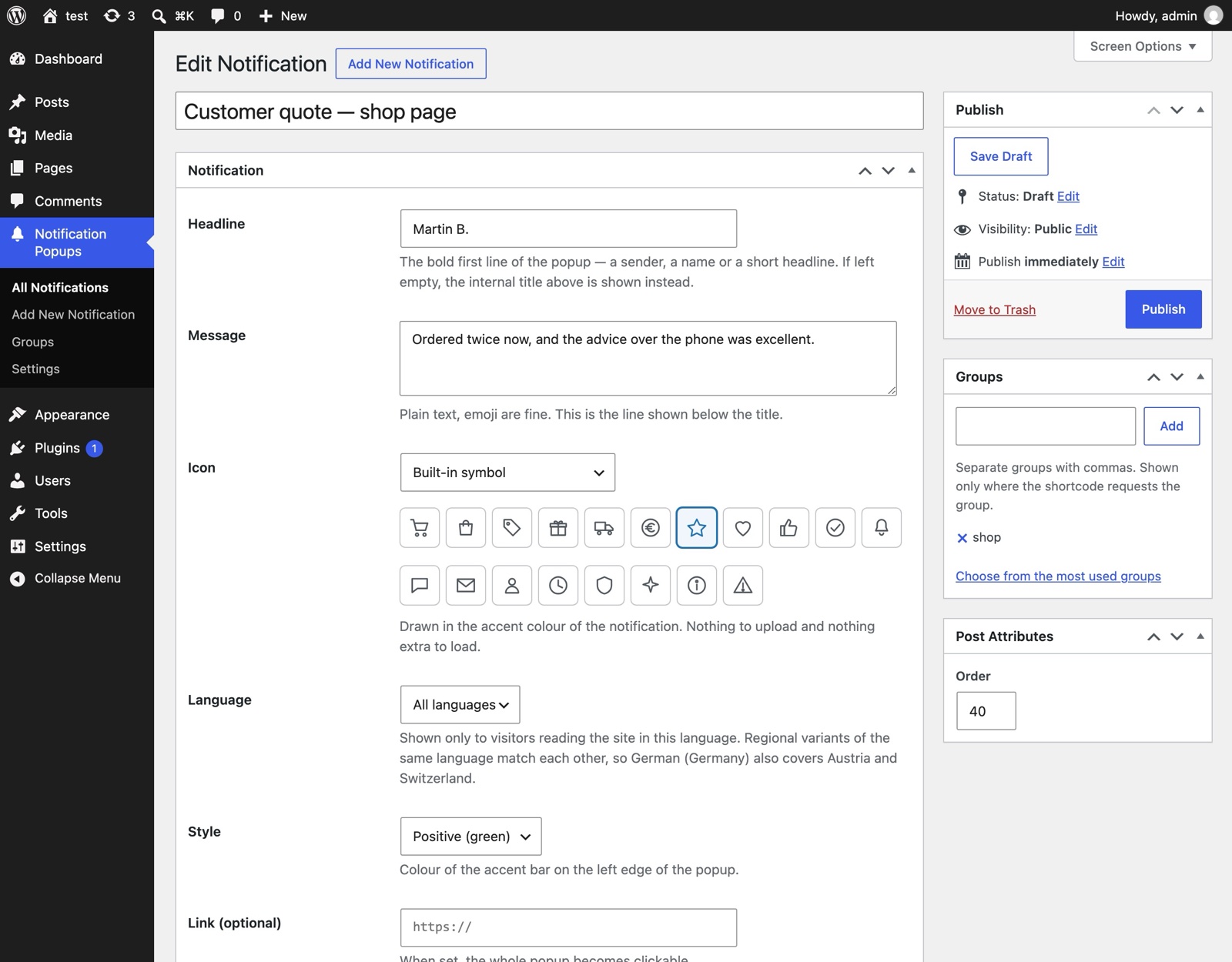
Editing a notification: internal title for the admin, the headline visitors see, message, icon, language, style — and the group that decides where it appears.
Download
Free on the official plugin directory: Wonderful Notification Popups on WordPress.org.
Questions about this tool? Get in touch.